Know your tokens. Own your costs.
A few weeks ago someone on Twitter (or it's X.com now) was mansplaining to me that LLM tokens are basically random, that nobody really knows how they are calculated and that there is no way to log or control them. Which was unfortunate for him because at my previous job I was doing observability on token usage for a POC agent, tracking input and output tokens per model through the OpenAI API.
I did not win that argument because I just banned the guy, but it got me thinking. Not because he was wrong, that part was obvious, but because the confusion seemed real. Tokens sound abstract, the pricing pages list them but never really show what they are and if you have not worked with the APIs directly it is easy to assume there is some black box magic involved.
There is not. Tokens are deterministic, countable and loggable. Some providers like OpenAI and Google even let you see exactly how your text gets split and count tokens before sending a request and every API response tells you exactly how many tokens went in and came out. Let's see how it actually works.
One note before we start: this post focuses on text tokens only. Image, audio and video inputs have their own tokenization rules and pricing, but that is a separate topic.
What is a token
Before we get to any code, let's understand what we are actually talking about.
When you send text to an LLM, the model does not read words or characters. It reads tokens, which are chunks of text that the model learned to treat as single units. A token can be a whole word like "hello", a piece of a word like "ing" or "pre", a single character like "." or even a space. The model has a fixed vocabulary of these chunks, usually between 50,000 and 200,000 of them and every piece of text you send gets split into a sequence of tokens from that vocabulary.
This was not always how it worked. Early NLP models tokenized by words, which sounds intuitive but breaks down fast because every misspelling, new word or compound term becomes an unknown token. Then there were character-level models that read one letter at a time, which solved the unknown word problem but made sequences extremely long and expensive. Modern LLMs use something in between called Byte Pair Encoding. BPE starts with individual characters and then iteratively merges the most frequent pairs into new tokens until the vocabulary reaches the target size. So common words like "the" become a single token, while rare words get split into smaller pieces that the model has seen before.
The practical result is that common English text tokenizes to roughly 1 token per 4 characters, but that ratio changes a lot depending on the language, the domain and the specific tokenizer.
You can see all of this happening with tiktoken, which is OpenAI's open source tokenizer library. I chose my prompt for this article as classical interview question 'What happens when you type a URL into a browser and press enter?'
import tiktoken

enc = tiktoken.encoding_for_model("gpt-5")
text = "What happens when you type a URL into a browser and press enter?"

tokens = enc.encode(text)
print(tokens)
print([enc.decode([t]) for t in tokens])
That gives you the token IDs and the actual text each one represents:
[4827, 13367, 1261, 481, 1490, 261, 9206, 1511, 261, 10327, 326, 4989, 5747, 30]
['What', ' happens', ' when', ' you', ' type', ' a', ' URL', ' into', ' a', ' browser', ' and', ' press', ' enter', '?']
Let's try the same question in Russian text = "Что происходит, когда вы вводите URL в браузер и нажимаете Enter?" and see how the splits change.
[63048, 63017, 11, 21029, 3341, 108579, 6989, 9206, 743, 120026, 1025, 816, 90565, 2271, 82786, 12240, 30]
['Что', ' происходит', ',', ' когда', ' вы', ' ввод', 'ите', ' URL', ' в', ' брауз', 'ер', ' и', ' наж', 'им', 'аете', ' Enter', '?']
The English version produced 14 tokens while the same question in Russian took 17 and you can see why - words like "происходит" and "нажимаете" got split into multiple pieces because the tokenizer's vocabulary has fewer Russian subwords to work with which is why I usually work with LLMs only in English.
One more thing worth knowing: if you do not want to install anything locally, OpenAI also has an online tokenizer at platform.openai.com/tokenizer where you can paste text and see the splits visually. It is useful for quick checks but for anything repeatable you want the library.
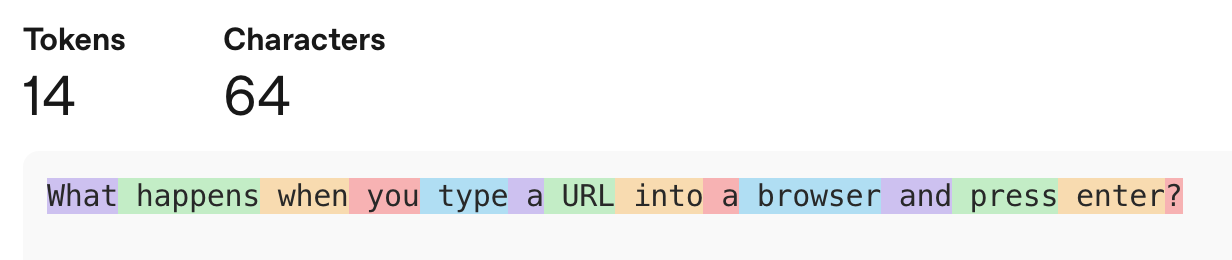
Same text, different bill
Different models use different tokenizers with different vocabulary sizes, which is why the same text produces different token counts depending on which model you use. Older models like GPT-4 use a tokenizer called cl100k_base with roughly 100,000 tokens in its vocabulary, while newer models like GPT-4o, GPT-5 and the reasoning family (o1, o3, o4-mini) all use o200k_base which has about 200,000. Bigger vocabulary means more common patterns get merged into single tokens, which means fewer tokens for the same text, which means you pay less per request.
You can see this directly with tiktoken:
import tiktoken

text = "What happens when you type a URL into a browser and press enter?"

for model in ["gpt-4", "gpt-5"]:
    enc = tiktoken.encoding_for_model(model)
    tokens = enc.encode(text)
    print(f"{model}: {len(tokens)} tokens")
    print(tokens)
    print([enc.decode([t]) for t in tokens])
    print()
The output:
gpt-4: 14 tokens
[3923, 8741, 994, 499, 955, 264, 5665, 1139, 264, 7074, 323, 3577, 3810, 30]
['What', ' happens', ' when', ' you', ' type', ' a', ' URL', ' into', ' a', ' browser', ' and', ' press', ' enter', '?']

gpt-5: 14 tokens
[4827, 13367, 1261, 481, 1490, 261, 9206, 1511, 261, 10327, 326, 4989, 5747, 30]
['What', ' happens', ' when', ' you', ' type', ' a', ' URL', ' into', ' a', ' browser', ' and', ' press', ' enter', '?']
In this case both produce 14 tokens and the splits are identical - the text is simple common English so both vocabularies handle it the same way. The difference shows up in the token IDs, which are completely different numbers because they are two separate vocabulary tables. Where it starts to matter is longer text, technical jargon, code or non-English languages, where the larger vocabulary has a better chance of fitting things into fewer tokens.
But that is just OpenAI versus OpenAI. Claude, Gemini and others each have their own tokenizers built on their own training data and none of them are compatible with tiktoken. You cannot run Claude's tokenizer locally the way you can with OpenAI's.
What you can do is count tokens before making a request. Anthropic has a dedicated /v1/messages/count_tokens endpoint:
from anthropic import Anthropic
import os

os.environ["ANTHROPIC_API_KEY"] = 'your_key'

client = Anthropic()
text = "What happens when you type a URL into a browser and press enter?"

response = client.messages.count_tokens(
    model="claude-sonnet-4-6",
    messages=[{"role": "user", "content": text}],
)
print(response.input_tokens)
Claude Sonnet 4.6, Haiku and Opus returned 21 tokens for the same input, which makes sense because models from the same provider typically share the same tokenizer - the difference between Sonnet and Opus is in capability and price, not in how they split text.
Gemini shows the same pattern within its own family. Using Google's count_tokens API:
from google import genai

client = genai.Client(api_key="YOUR_KEY")
text = "What happens when you type a URL into a browser and press enter?"

for model in ["gemini-2.5-flash", "gemini-3-flash-preview"]:
    result = client.models.count_tokens(model=model, contents=text)
    print(f"{model}: {result.total_tokens} tokens")
Both models returned 15 tokens - but that is 15 versus Claude's 21 for the exact same text. Different provider, different tokenizer, different count. For more details see Google's token counting guide. Anthropic also has a detailed guide on token counting, see Token counting in the Claude docs.
So far we have been counting tokens before making a request, which is useful for cost estimation and prompt optimization. But in production what matters is what comes back - every API response includes the actual token usage for that call, broken down into input and output tokens. Some models also report reasoning tokens separately. Let's make the same request to all three providers and see what we get.
What comes back: tokens in API responses
Counting tokens before a request is useful for cost estimation, but in production what matters is what comes back. Every API response includes the actual token usage for that call, broken down into input and output tokens. Some models also report reasoning tokens separately. Let's make the same request to all three providers and see what we get.
Claude:
import os
from anthropic import Anthropic

os.environ["ANTHROPIC_API_KEY"] = 'YOUR_KEY'

client = Anthropic()
text = "What happens when you type a URL into a browser and press enter?"

response = client.messages.create(
    model="claude-sonnet-4-6",
    max_tokens=1024,
    messages=[{"role": "user", "content": text}],
)

print(f"Input tokens:  {response.usage.input_tokens}")
print(f"Output tokens: {response.usage.output_tokens}")
Claude's response:
What Happens When You Type a URL and Press Enter
This is a classic technical interview question. Here's a thorough breakdown:
- URL Parsing The browser breaks down the URL into components: Protocol (https://), Domain (example.com), Path (/page), Query params (?id=1)
- DNS Resolution The browser needs to find the IP address for the domain. Check order: Browser cache, OS cache / hosts file, Router cache, ISP's DNS resolver, Recursive query through Root → TLD → Authoritative nameservers. Result: An IP address like 93.184.216.34
- TCP Connection A TCP handshake occurs (SYN → SYN-ACK → ACK). For HTTPS, a TLS handshake follows: Negotiates encryption protocol, Server sends certificate, Browser verifies it, Encryption keys are exchanged
- HTTP Request The browser sends a request: GET /page HTTP/1.1, Host: example.com, Headers: (cookies, user-agent, etc.)
- Server Processing Server receives request, Routing, business logic, database queries, Builds a response
- HTTP Response HTTP/1.1 200 OK, Content-Type: text/html, [HTML body]
- Browser Rendering Parse HTML → build DOM tree, Parse CSS → build CSSOM tree, Combine into Render Tree, Layout - calculate element positions/sizes, Paint - draw pixels to screen, Compositing - layer management. Along the way, additional requests fire for JS, CSS, images, fonts, etc.
The whole process typically happens in milliseconds to a few seconds.
This entire answer cost 21 input tokens and 602 output tokens. The 21 input tokens are our prompt, the 602 output tokens are everything Claude generated above. That is what you are paying for on every API call. Claude Sonnet 4.6 costs $3 per million input tokens and $15 per million output tokens (see Anthropic's pricing page for all models). So our call used 21 input tokens and 602 output tokens, which works out to $0.000063 for input and $0.00903 for output - roughly $0.009 total, less than a cent. That sounds like nothing, but multiply it by thousands of requests per day and those fractions add up fast, which is exactly why tracking tokens matters.
If you switch to a smaller model like claude-haiku-4-5, the same prompt returns 21 input tokens (same tokenizer, same count) but only 325 output tokens instead of 602. The input side stays the same because all Claude models share the same tokenizer, but the output side depends on how verbose the model decides to be and smaller models tend to give shorter answers. At Haiku's pricing of $1 per million input tokens and $5 per million output tokens, this call costs roughly $0.0016, almost six times cheaper than the same question on Sonnet.
And this is just the base cost - the full picture is more nuanced. When you enable extended thinking, Claude generates thinking tokens on top of the visible output and those are billed at the same output rate. There are also ways to reduce what you pay, like prompt caching which lets you reuse previously processed input tokens at a fraction of the price. We will get into all of that in the next chapter.
OpenAI:
from openai import OpenAI

client = OpenAI(api_key="YOUR_KEY")
text = "What happens when you type a URL into a browser and press enter?"

response = client.chat.completions.create(
    model="gpt-5.4",
    messages=[{"role": "user", "content": text}],
)

print(f"Input tokens:  {response.usage.prompt_tokens}")
print(f"Output tokens: {response.usage.completion_tokens}")
print(f"Total tokens:  {response.usage.total_tokens}")
OpenAI returned 20 input tokens and 688 output tokens with reasoning_tokens: 0. GPT-5.4 is a reasoning model but in this case the question was simple enough that it did not need to think - the reasoning token count stays at zero. With a harder prompt that number stops being zero and becomes a significant part of your bill.
Gemini:
from google import genai

client = genai.Client(api_key="YOUR_KEY")
text = "What happens when you type a URL into a browser and press enter?"

response = client.models.generate_content(
    model="gemini-2.5-flash",
    contents=text,
)

print(f"Input tokens:    {response.usage_metadata.prompt_token_count}")
print(f"Output tokens:   {response.usage_metadata.candidates_token_count}")
print(f"Usage:    {response.usage_metadata}")
The response on usage:
GenerateContentResponseUsageMetadata(
  candidates_token_count=1387,
  prompt_token_count=15,
  prompt_tokens_details=[
    ModalityTokenCount(
      modality=<MediaModality.TEXT: 'TEXT'>,
      token_count=15
    ),
  ],
  thoughts_token_count=1203,
  total_token_count=2605
)
Gemini returned 15 input tokens and 1,387 output tokens. At $0.30 per million input tokens and $2.50 per million output tokens for Gemini 2.5 Flash (see Google's pricing page), that works out to roughly $0.0035 total - significantly cheaper than Claude for this particular call. But notice something else in the response: thoughts_token_count: 1203. Those are thinking tokens that Gemini generated separately from the visible output. The total was 2,605 tokens, not 1,402.
The hidden tokens
We already saw hints of this in the previous section - Gemini's thoughts_token_count: 1203 and OpenAI's reasoning_tokens: 0. These are tokens the model generates internally before producing the visible answer and they are a real part of your cost.
To understand what reasoning tokens actually are, think about what happens when you ask a model a hard question. Before writing the answer, the model generates a chain of internal steps. It might restate the problem, list possible approaches, work through each one, check for mistakes and settle on a final strategy. All of that is text, real tokens generated one after another, exactly like the output you see. The difference is that the reasoning content itself is not included in the response text, you only see the final answer. But the token count is reported in the usage metadata, they still used compute and they are still billed as output tokens, because that is exactly what they are: output that the model produced but did not include in the visible answer.
OpenAI: reasoning effort
Reasoning Open AI models like GPT-5.4 supports a reasoning parameter with effort levels: none (default), low, medium, high and xhigh. When set to none, the model responds without thinking and reasoning_tokens stays at zero, which is what we saw in our earlier call. Let's ask the same question with reasoning turned on:
from openai import OpenAI

client = OpenAI(api_key="YOUR_KEY")
text = "What happens when you type a URL into a browser and press enter?"

for effort in ["none", "low", "medium", "high"]:
    response = client.responses.create(
        model="gpt-5.4",
        input=text,
        reasoning={"effort": effort},
    )
    r = response.usage
    print(f"effort={effort:6s} | input={r.input_tokens} | output={r.output_tokens} | reasoning={r.output_tokens_details.reasoning_tokens} | total={r.total_tokens}")
The output:
effort=none   | input=20 | output=1102 | reasoning=0 | total=1122
effort=low    | input=20 | output=862 | reasoning=11 | total=882
effort=medium | input=20 | output=1695 | reasoning=107 | total=1715
effort=high   | input=20 | output=2205 | reasoning=430 | total=2225
The reasoning tokens go from 0 at none to 11 at low, 107 at medium and 430 at high. Those reasoning tokens are not a separate charge, they are counted inside the output tokens and billed at the output rate of $15 per million tokens. At GPT-5.4's pricing (OpenAI's pricing page) the none call costs $0.0166, low is actually cheaper at $0.013 because the model gave a shorter answer, medium jumps to $0.0255 and high hits $0.0331. Same prompt, same model, but the cost doubled from none to high because the model spent 430 tokens thinking and produced a longer answer on top of that.
Claude: extended thinking
Anthropic's equivalent is extended thinking. On Sonnet 4.6 and Opus 4.6 the recommended approach is adaptive thinking with an effort parameter, similar to OpenAI:
from anthropic import Anthropic
import os

os.environ["ANTHROPIC_API_KEY"] = 'YOUR_KEY'

client = Anthropic()
text = "What happens when you type a URL into a browser and press enter?"

for effort in ["low", "medium", "high"]:
    response = client.messages.create(
        model="claude-sonnet-4-6",
        max_tokens=16000,
        thinking={"type": "adaptive"},
        output_config={"effort": effort},
        messages=[{"role": "user", "content": text}],
    )
    print(f"effort={effort:6s} | input={response.usage.input_tokens} | output={response.usage.output_tokens}")
The output:
effort=low    | input=21 | output=404
effort=medium | input=21 | output=557
effort=high   | input=21 | output=603
The pattern is similar to OpenAI: higher effort means more output tokens. The thinking tokens are included in the output count and billed at the same $15 per million output rate. At low the total cost is about $0.006, at high it is $0.009. The jump is smaller than what we saw with OpenAI because for a simple question like ours Claude's adaptive thinking does not generate much internal reasoning at any level.
Gemini: thinking budget and thinking level
Gemini 2.5 Flash uses thinking_budget which is a raw token number from 0 to 24,576. It works but it is harder to compare across providers because you are setting a ceiling in tokens rather than picking an effort level. Gemini 3 models introduced thinking_level which works more like OpenAI's effort parameter with named levels: minimal, low, medium and high. Let's use gemini-3-flash-preview to get a comparable comparison:
from google import genai
from google.genai import types

client = genai.Client(api_key="YOUR_KEY")
text = "What happens when you type a URL into a browser and press enter?"

for level in ["minimal", "low", "medium", "high"]:
    response = client.models.generate_content(
        model="gemini-3-flash-preview",
        contents=text,
        config=types.GenerateContentConfig(
            thinking_config=types.ThinkingConfig(thinking_level=level)
        ),
    )
    m = response.usage_metadata
    print(f"level={level:7s} | input={m.prompt_token_count} | output={m.candidates_token_count} | thinking={m.thoughts_token_count} | total={m.total_token_count}")
The output:
level=minimal | input=15 | output=893 | thinking=None | total=908
level=low     | input=15 | output=1024 | thinking=576 | total=1615
level=medium  | input=15 | output=1085 | thinking=590 | total=1690
level=high    | input=15 | output=975 | thinking=403 | total=1393
At minimal there are no thinking tokens at all and the model produces 893 output tokens. Once you switch to low the thinking kicks in with 576 tokens and medium is similar at 590. Interestingly high used fewer thinking tokens (403) than low and medium in this case, which shows that the levels are ceilings, not guarantees: the model decides how much thinking it actually needs and a simple question like ours does not require deep reasoning regardless of the level you set. The cost difference is still real though. At Gemini 3 Flash pricing of $0.50 per million input tokens and $3 per million output tokens (Google's pricing page), the minimal call with 908 total tokens costs about $0.0027, while medium with 1,690 total tokens costs $0.005. Thinking tokens are billed as output tokens at the same rate.
The takeaway from all of this is that your cost per API call has three levers, not one. Changing the provider changes how your text gets tokenized and what you pay per token. Changing the model within the same provider changes the per-token rate. And changing the reasoning effort can multiply your output tokens several times over without touching your prompt. A single request can cost $0.003 on Gemini 3 Flash at minimal thinking or $0.033 on GPT-5.4 at high effort. That is a 10x difference for the same question. Knowing which levers exist is the first step, the next step is logging them so you can actually see what your application is spending.
Cached tokens
We saw cache_read_input_tokens: 0 in Claude's response and cached_tokens: 0 in OpenAI's response earlier. Those fields exist because all three providers support some form of prompt caching and when it kicks in, it can significantly reduce your input token costs.
If you send multiple requests that share the same prefix (a long system prompt, a document, a conversation history that keeps growing), the provider can cache the processed version of that shared part and reuse it on subsequent calls instead of processing it from scratch. You pay full price the first time, then a fraction of the price on every follow-up request that hits the cache.
How it shows up in each provider's response:
- OpenAI reports
cached_tokensinsideinput_tokens_details. Cached input tokens are billed at 50% of the regular input rate. Caching happens automatically, you do not need to opt in. - Claude reports
cache_creation_input_tokensandcache_read_input_tokensin the usage object. Cache reads are billed at 10% of the regular input rate, which is a massive discount. Claude requires you to add acache_controlfield to your request to enable it. - Gemini reports cached tokens through its context caching API. Cached tokens are billed at 75% less than the standard input rate. Gemini also supports automatic caching on repeated prefixes without explicit configuration.
The practical impact depends on your usage pattern. If every request is unique with no shared prefix, caching does nothing. But if you are building a chatbot with a long system prompt, doing RAG with the same document across multiple queries, or running an agent that makes repeated calls with growing context, caching can cut your input costs by 50-90% depending on the provider. That is why it matters to log cached token counts separately: if your monitoring shows cache hit rates dropping, your costs are going up even if your traffic stays flat.
Logging and monitoring your token usage
At this point we know how to count tokens, how to read them from API responses and how different models and reasoning levels affect the cost. The missing piece is actually tracking this in production so you can answer questions like "how much did we spend on Claude last week" or "which endpoint is burning through tokens fastest."
The core idea is simple: every time you make an API call, log the usage metadata somewhere. The minimum you want to capture is the timestamp, provider, model name, input tokens, output tokens and reasoning/thinking tokens if applicable. If you are running multiple features or agents, add a tag or label so you can break down usage per use case.
Where you store this depends on your scale. For a side project or POC a SQLite database or even a CSV file is enough. For a production service you probably want PostgreSQL or a data warehouse like BigQuery or Snowflake where your data team can query it alongside other operational metrics. Some teams just push token usage into their existing logging pipeline, whether that is Datadog, CloudWatch or whatever they already use for application metrics. The storage choice does not matter much as long as the data gets captured consistently on every call.
Do not calculate costs in your application code. Providers change their prices and if you hardcode rates into your logger you need to redeploy every time that happens. Instead log the raw token counts and the model name, then maintain a pricing table in your database or BI tool that maps each model to its current input and output rates. When prices change you update one table and all your historical reports recalculate automatically. Just make sure your pricing table accounts for the different token types separately: input tokens, output tokens, reasoning/thinking tokens (billed at the output rate) and cached tokens (billed at a discounted rate) all have different prices.
For visualization you have a range of options. The simplest is a Jupyter notebook with pandas where you query your logs, group by model or by day and plot the costs. One step up is a dashboard in your BI tool like Metabase, Superset, Looker or Tableau connected to whatever database you chose. If your team already runs Grafana for infrastructure monitoring, adding a token usage dashboard there makes sense because the people who care about API costs are often the same people watching latency and error rates. Some teams build a simple internal page with Streamlit or Retool that shows daily spend per model and alerts when costs spike. There are also third-party platforms built specifically for LLM observability like Helicone, LangSmith and Portkey that sit as a proxy around your API calls and capture token usage, latency and costs automatically.
The important thing is that you log something. The exact tool does not matter. What matters is that when someone asks "how much does this feature cost us in API calls" you have a real number instead of a guess.
So yeah, you can count tokens
Tokens are not random and they are not hard to track. Every provider returns them in the API response, you just need to log them somewhere and build a pricing table in your BI. If someone on Twitter tells you otherwise, now you have the receipts.